Free cheat sheet for your team
Phishing emails don’t look like scams anymore. They look like a shared document, a package that couldn’t be delivered, a voicemail, a QR code on a “required” form, or a note from the boss. Filters catch a lot, but some always get through, and then it comes down to the person reading it. A few minutes of practice makes that person much harder to fool.
A fake sign-in page behind a familiar-looking link.
On a PDF “benefits form” or a parking notice, so the link skips the email filter and lands on a phone.
An audio file or link that asks you to sign in to listen.
A toll you didn’t pay, a package on hold, a “bank” alert.
“Are you at your desk? I need a favor,” then gift cards or a payment.
Short lessons. Bite-sized videos and quizzes your team can finish between other work. No day-long seminars.
Realistic practice. Simulated phishing emails, like the real ones, sent to your team from time to time.
Learn in the moment. Click a simulation and you get a short, friendly explanation of what you missed, not a lecture or a note to your manager.
Reports you can use. See who’s improving and who could use more help, and keep the records insurers and auditors ask for.
Your team becomes an early warning. People who know what to look for report the strange email before anyone else clicks it.
Insurance and compliance ask for it. Many cyber insurance applications and compliance frameworks ask whether staff get security training. This gives you a yes, with records.
It’s already included. Training and simulated phishing are part of every one of our managed plans.
Maria in accounts gets an email that looks like a shared invoice. She notices the sender’s address is one letter off, doesn’t click, and hits the report button. It was one of our practice emails, so she gets a quick “nice catch.” Two weeks later a real one arrives, and she spots that too.
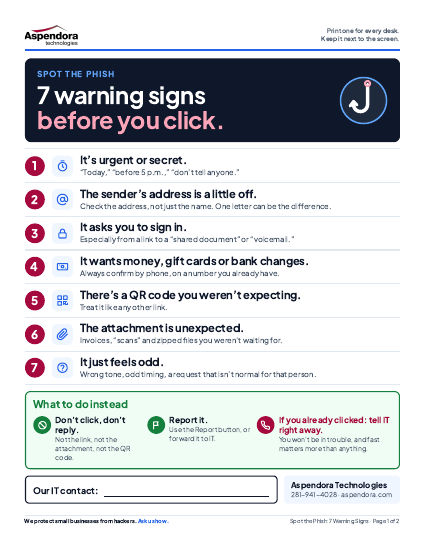
Print page 1 for every desk: seven warning signs and what to do instead. Page 2 is for you: how to run training your team won’t dread.
You can download it right away on the next page. Prefer to talk? Call 281-941-4028.
Important! We hate spam as much (or more!) than you and promise to NEVER rent, share, or abuse your e-mail address and contact information in any way.
Book a 15-minute discovery call. No pressure and no obligation.
Systems down right now? Call 281-941-4028.
We ask before we track you.
Nothing from Google, Microsoft, or Meta loads on this site unless you say yes. We keep basic, cookieless visit counts on our own server either way. Details in our Privacy Policy.
Essential site function and first-party, cookieless visit counts run either way and can't be switched off here.