Free checklist for business owners
Business email compromise doesn’t need a virus. A criminal gets into one mailbox, or sets up an address that looks like yours, reads along for a while, then sends a perfectly normal-looking email: new bank details for a vendor, a payroll change, an urgent wire from “the boss.” By the time anyone notices, the money is gone.
“We’ve changed banks, please use the new account for this invoice.”
An urgent request for a wire, a payment or gift cards, “I’m in a meeting, just get it done.”
An employee “asks” HR to send their paycheck to a new account.
A real employee’s mailbox is used to send fraud to your own customers.
W-2s, client files or banking details requested by someone who seems legitimate.
A stolen password, from a fake sign-in page or a breach somewhere else.
A fake sign-in page that steals the session, so the attacker gets in even when multi-factor authentication is on.
A hidden inbox rule that forwards or hides emails, so the real person never sees the replies.
A look-alike domain one letter off yours, or email spoofed from your own domain.
Your bookkeeper gets an email from a vendor you’ve used for years: their bank changed, please update the account before Friday’s payment. The email really came from the vendor’s mailbox, because the vendor’s account was taken over. Your rule says call first. She calls the number on file, the vendor knows nothing about it, and the payment goes to the right place.
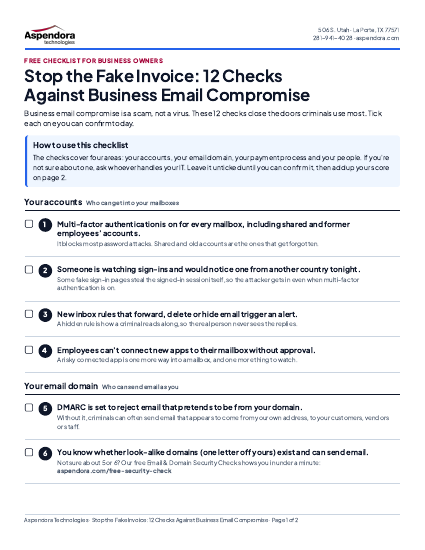
12 checks across your accounts, your email domain, your payment process and your people, plus what to do in the first hour if you think you’ve been hit.
You can download it right away on the next page. Prefer to talk? Call 281-941-4028.
Important! We hate spam as much (or more!) than you and promise to NEVER rent, share, or abuse your e-mail address and contact information in any way.
Run our free Email & Domain Security Check. It takes under a minute and checks spoofing protection and look-alike domains.
Book a 15-minute discovery call. No pressure and no obligation.
Systems down right now? Call 281-941-4028.
We ask before we track you.
Nothing from Google, Microsoft, or Meta loads on this site unless you say yes. We keep basic, cookieless visit counts on our own server either way. Details in our Privacy Policy.
Essential site function and first-party, cookieless visit counts run either way and can't be switched off here.