Free checklist for business owners
Most attacks don’t happen while you’re at your desk. They start at night, on weekends and over holidays, when nobody is looking at the screen. Antivirus can block what it recognizes. It can’t pick up the phone, investigate, or cut a computer off from the network before the problem spreads. That’s what a 24/7 security operations center does.
Watch. Small agents on your computers and a connection to your Microsoft 365 report unusual activity, day and night.
Investigate. Trained security analysts in our 24/7 SOC look at what was flagged and decide whether it’s real. No pile of alerts for you to sort through.
Contain. If it’s real, they can isolate the computer or lock the account right away, so it can’t spread.
Fix and explain. We clean up, get you back to work, and tell you in plain English what happened and what we changed.
Suspicious programs, ransomware behavior, attackers hiding in normal-looking tools.
Sign-ins from unusual places, new inbox rules that forward your email, risky connected apps.
Firewall and system logs kept and reviewed, so there’s a record when you need one.
Phishing and malicious attachments filtered before they reach your team.
Short training and simulated phishing emails, so staff spot what gets through.
2:14 a.m. on a Sunday. Someone signs in to your office manager’s email from another country and creates a rule that forwards every invoice to an outside address. The SOC flags it, an analyst confirms it isn’t her, and the account is locked. Monday morning we reset her password, remove the rule, check what was sent, and walk you through it. Nobody paid a fake invoice.
Antivirus is a good start. Here’s what round-the-clock managed cybersecurity adds.
| Antivirus on its own | 24/7 managed cybersecurity | |
|---|---|---|
| Blocks known malware | Yes | Yes |
| Spots attackers using normal tools or stolen logins | Rarely | Yes, people look at the behavior |
| Someone looks at alerts at 2 a.m. | No | Yes |
| Can isolate a computer or lock an account | No | Yes |
| Watches Microsoft 365 sign-ins | No | Yes |
| Tells you what happened, in plain English | No | Yes |
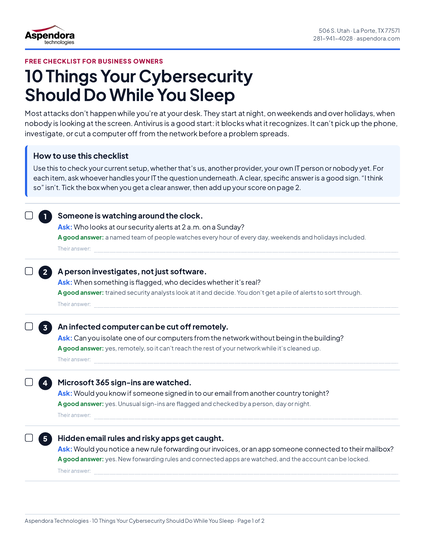
Use it to check your current setup, whether that’s us, another provider, your own IT person or nobody yet. Each item comes with the question to ask.
You can download it right away on the next page. Prefer to talk? Call 281-941-4028.
Important! We hate spam as much (or more!) than you and promise to NEVER rent, share, or abuse your e-mail address and contact information in any way.
Book a 15-minute discovery call. No pressure and no obligation.
Systems down right now? Call 281-941-4028.
We ask before we track you.
Nothing from Google, Microsoft, or Meta loads on this site unless you say yes. We keep basic, cookieless visit counts on our own server either way. Details in our Privacy Policy.
Essential site function and first-party, cookieless visit counts run either way and can't be switched off here.